

Ecommerce Catalog Management: A 30-Minute Manual Work Audit

It is Friday, 4:40 pm. You open Shopify to fix one price, then spot the same typo in four descriptions and a missing size on a variant. An hour later the "quick fix" is still running, and Monday's list is no shorter.
Ecommerce catalog management is full of jobs like this: small, repeated, easy to postpone, and expensive in total. A survey of 470 ecommerce leaders, reported by Digital Commerce 360 in October 2025, puts a number on it. Teams spend an average of 36% of their week on repetitive marketplace updates.

Those are marketplace sellers, so your number may differ. This post shows you how to find it with a 30-minute audit, then how to decide what to fix first. You need a spreadsheet and one week of notes, nothing else.
In short:
- Log every manual catalog task for one week, with minutes and mistakes.
- Sort each task by how often it repeats and what a mistake costs.
- Fix the repeat jobs first, one change at a time, and measure again.
What the survey measured, and what it did not
A marketplace integration platform ran the survey, so it has a stake in this topic. Digital Commerce 360 reported the results in October 2025: 470 ecommerce leaders across the United States and Europe, selling on an average of six marketplaces.
Three findings matter for catalog work:
- Teams spend an average of 36% of their week, about two working days, on repetitive marketplace updates, and one in five sellers spend half their week fixing listings, adjusting prices or correcting data errors.
- 52% still manage listings and inventory with spreadsheets or internal tools, and 45% still update content and pricing by hand.
- 91% call automation business critical, and 29% name pricing and visibility as their toughest challenge.
What does a marketplace figure mean for a Shopify catalog? The task types overlap: price and promotion changes, inventory updates, listing and variant fixes, supplier files and photos. If you sell only on Shopify, your share could be lower or higher.
For scale, 36% of a 40-hour week is 14.4 hours, or 1.8 working days. Treat it as a benchmark, not a verdict: your own number is measurable, and the audit below measures it.
Step 1. Log a week of manual catalog work
For five working days, write down every catalog task you do by hand. Use a spreadsheet or a notes app and keep it open next to Shopify, so logging takes seconds. Think of the whole ecommerce workflow, from supplier file to live product page.
Include the small jobs. The repeats are the point of this exercise.
Use these columns, shown here with one illustrative row:
| Task | Where | Times this week | Minutes each | Products touched | Went wrong? |
| Raise prices on one collection | Shopify admin | 3 | 25 | 120 | Yes: 8 wrong compare-at prices |
If you run out of ideas, scan this list: price and promotion changes, inventory updates, listing and variant fixes, supplier file reformatting, photo and media updates, and edits after returns. At the end of the week, add up the minutes and divide by the hours you worked. That is your share. Compare it with the survey's 36% as a rough yardstick, since that figure covers marketplace workloads.
To put a price on it, multiply your weekly hours by 52 and by your loaded hourly cost. As a hypothetical example, 10 hours a week at $30 an hour is $15,600 a year. Swap in your own numbers; the example is not a finding.
Step 2. Sort each task by repeat rate and cost of a mistake
Take your log and ask two questions about each task. How often does it repeat? And what does a mistake cost: a typo someone fixes in a minute, or a wrong price that sells for a day?
The answers put each task in one of four boxes, and each box has one play.
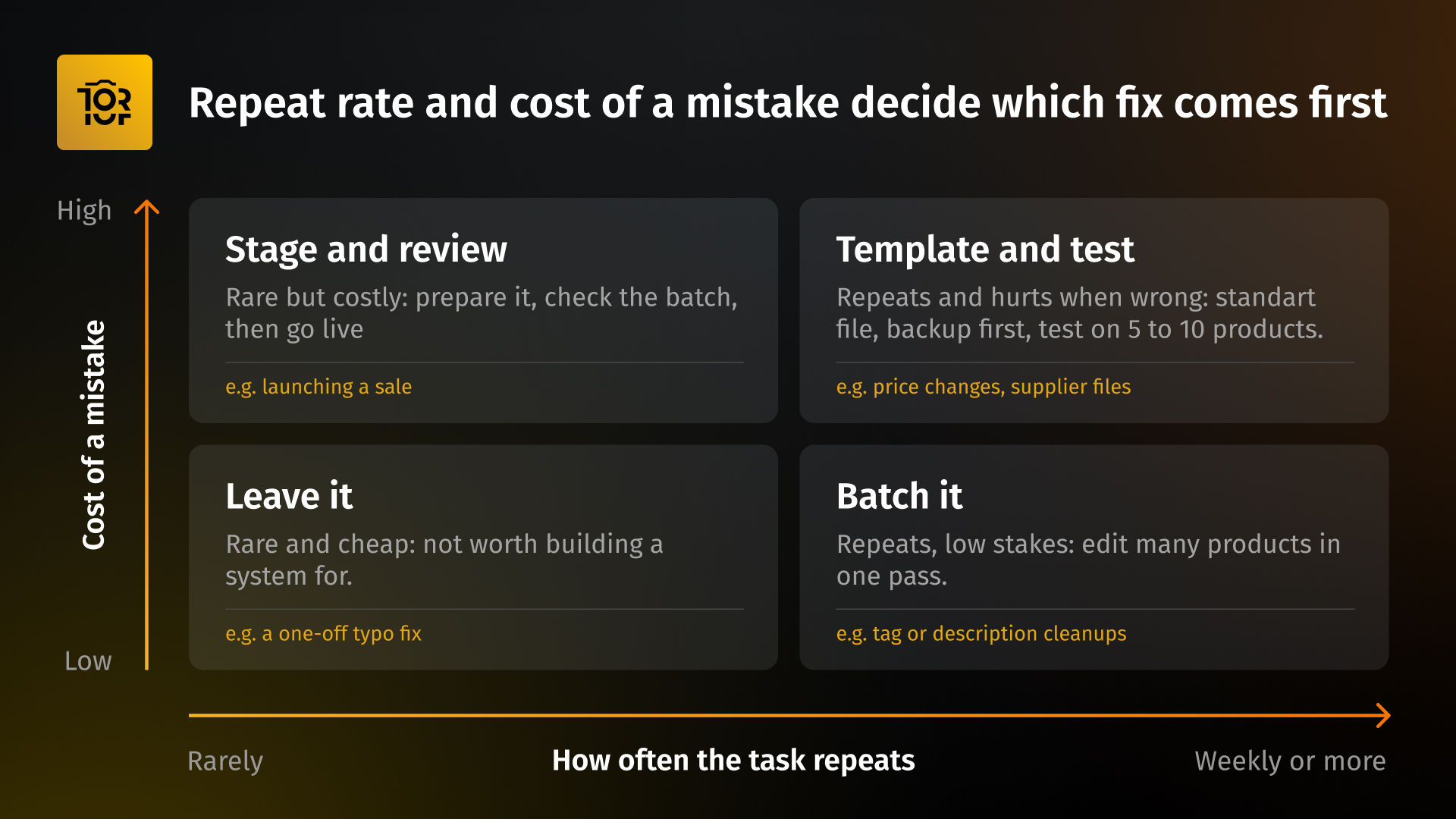
- Template and test (repeats often, mistakes cost a lot). Price changes and supplier file imports usually land here. Use a standard file, back up first, and test on five to ten products.
- Batch it (repeats often, mistakes cost little). Tag and description cleanups fit here. Change many products in one pass instead of one at a time.
- Stage and review (rare, mistakes cost a lot). Launching a sale is the classic case. Prepare the changes ahead of time and check the batch before it goes live.
- Leave it (rare, mistakes cost little). A one-off typo does not need a system.
A weekly supplier file is a good Shopify example of a repeat task with a high cost of error, because one wrong column can overwrite live data. Start with the two repeat boxes, rank the tasks in them by hours logged, and pick the top three. Those three are your audit results.
Step 3. Fix the repeat jobs first
Each fix below pairs a time saver with a safety step. Do not skip the safety step, because speed multiplies mistakes as well as savings.
Batch the field edits
Shopify's bulk editor lets you change multiple products and variants at the same time in a spreadsheet-style table. You select the products, choose the properties to update, and edit them in one view. The Shopify Help Center covers the details, including one quirk: for products with several variants, inventory is edited from the Inventory section.
A Shopify bulk edit works best when you batch by field, not by product: one change across many products, rather than many changes on one product. Export your products first, so you can roll back.
Standardize supplier files
Every supplier sends a different spreadsheet, and a Shopify CSV import expects its own format.
Three rules from Shopify's CSV column guide prevent most damage when you import products with Overwrite selected:
- A column that is in your file but empty replaces the existing value with a blank. A column left out of the file is left alone, so delete the columns you do not intend to change.
- If you update a variant-related column, such as price or SKU, include the Option1 name and Option1 value columns too. Without them, Shopify creates a new default variant and deletes the existing ones.
- Stores with more than one location need the separate inventory file, because the product file's inventory column applies to single-location stores.
Export a backup before every import and test on five to ten products. Our guide to a safe Shopify CSV import covers the rest.
Stage the risky changes
A sale is the riskiest routine change most stores make. Shopify lets you schedule an automatic discount with a start date and an optional end date, and it switches on and off by itself. It applies at cart and checkout, though, and does not edit the price stored on the product.
If you want shoppers to see new prices on the product page, you are changing stored prices. A Shopify schedule price change then usually takes extra setup, such as Shopify Flow or a pricing app, plus a plan for restoring the originals. Whichever route you pick, export current prices first and review the full batch before it goes live.
Keep photos tied to variants
Wrong photos on variants are a steady topic in the Shopify Community. One September 2026 thread shows a classic case: a colour and size combination that does not exist as a variant leaves the theme with nothing to match photos to, so the gallery shows every image. Replies suggested adding the missing variant with its photo assigned, or changing how the theme filters media by colour.
You can catch this product data quality problem in ten minutes. Open your best-selling product, click through every colour and every size, including sizes you do not stock, and note each photo that does not match. Fix the assignments, then repeat on your next ten products.
Step 4. Roll out one change, then re-measure
Change one thing at a time, or you will not know what worked. Use three timed steps:
- Week 1: back up and test. Export your products, pick one task from your top three, and test the new method on five to ten products.
- Weeks 2 and 3: run it and re-log. Use the new method every time that task comes up, and keep logging minutes and mistakes.
- Week 4: compare. Check hours and error count against your Step 1 log. Keep the change if both improved. If not, adjust before you move on.
Then repeat for the second task on your list, and put the next full audit in your calendar.
Where a tool like Toriut fits
Everything in steps 1 to 4 works with Shopify admin, a spreadsheet and some discipline. A catalog tool earns its place when the same jobs keep coming back.
Toriut is a Shopify-first product information management platform with a built-in media library. It maps to the fixes in Step 3.
You can change a field across the whole catalog in one pass. You can map a supplier's spreadsheet to Shopify's format before it touches your live store, and stage changes beside the live product to review them first. Photos stay tied to their variants, and you can search your media by product or your products by media.
It works alongside Shopify admin and does not manage marketplace feeds, so it covers the Shopify side of your audit, not the marketplace side. To see how it handles your own catalog, the 14-day free trial runs on sample data, so you can try it without connecting a store.
Make ecommerce catalog management audits a quarterly habit
Catalog work creeps back. New suppliers, collections and promotions each add tasks. Repeat the audit every quarter and keep the logs, so you can watch your number move.
To make it easy, we built a one-page audit sheet with the log, the triage grid and the hours-to-dollars calculator. Download the free Manual Work Audit sheet, no signup needed.
If you want a tool for the repeat jobs, try Toriut free for 14 days.
Guest post by: John Shpika is the founder and CEO of TopTechPhoto, the company behind Pics.io, a DAM platform with 40,000+ users, and Toriut, a Shopify-first Product Information Management Platform. A software engineer since 1999 and entrepreneur since 2012, he now focuses on helping ecommerce brands manage their product data.