

Shopify Bulk Discounts Vs Bundles: Which Pricing Strategy Drives More Sales?

Your Shopify store’s discount strategy is one of the few levers that can raise revenue fast. Whether you sell DTC products or wholesale, volume or quantity pricing can push customers to buy more, increase your average order value, and improve loyalty.
On Shopify, there are two very different approaches to bulk discounts: tiered pricing and volume bundle discounts. They both boost average order value, but they work in different ways. Both strategies work - but in different ways.
In this article, I clarify the difference, show practical use cases, and give you a step-by-step guide to set everything up with a Shopify bulk discounts app: Barn2 Bundles & Bulk Discounts. I also include tips to avoid common pitfalls and keep your margins safe.
What are Shopify Bulk Discounts?
Bulk discounts reward customers for buying more units of the same product. This is often called tiered pricing. Some merchants call it volume discounts or quantity breaks. Whatever you call it, the logic is simple: higher quantity means lower unit price.
A clean example looks like this: Buy 5+, save 10 percent. Buy 10+, save 15 percent. Buy 20+, save 20 percent. Customers see the thresholds on the Shopify product page. They do the math. They feel inspired to select bigger quantities to reach the next discount tier.
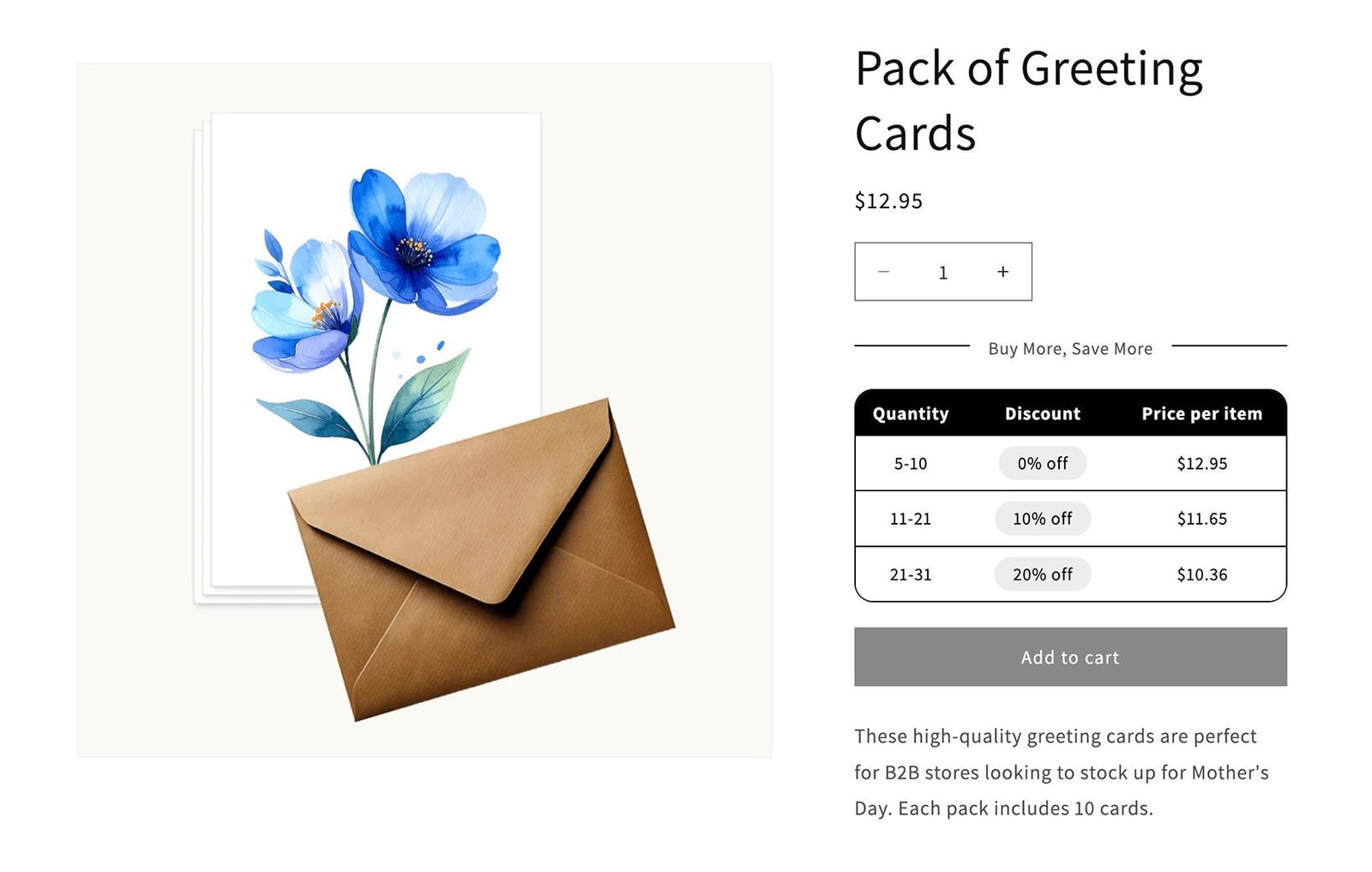
This works best for consumables, office supplies, and any product customers routinely buy in multiples. It also maps perfectly to B2B and wholesale behavior. In fact, many business buyers expect Shopify tiered pricing and a reward for buying more..
What are Shopify Volume Bundles?
Bundles group multiple quantities of a product into a single value offer. You can make them fixed or flexible.
Fixed bundles are merchant-defined packs. Think: Three T-shirts for 25 dollars. They are simple to launch and easy to promote. The customer simply selects the quantity they require, chooses their variants, and adds the volume bundle to their cart.
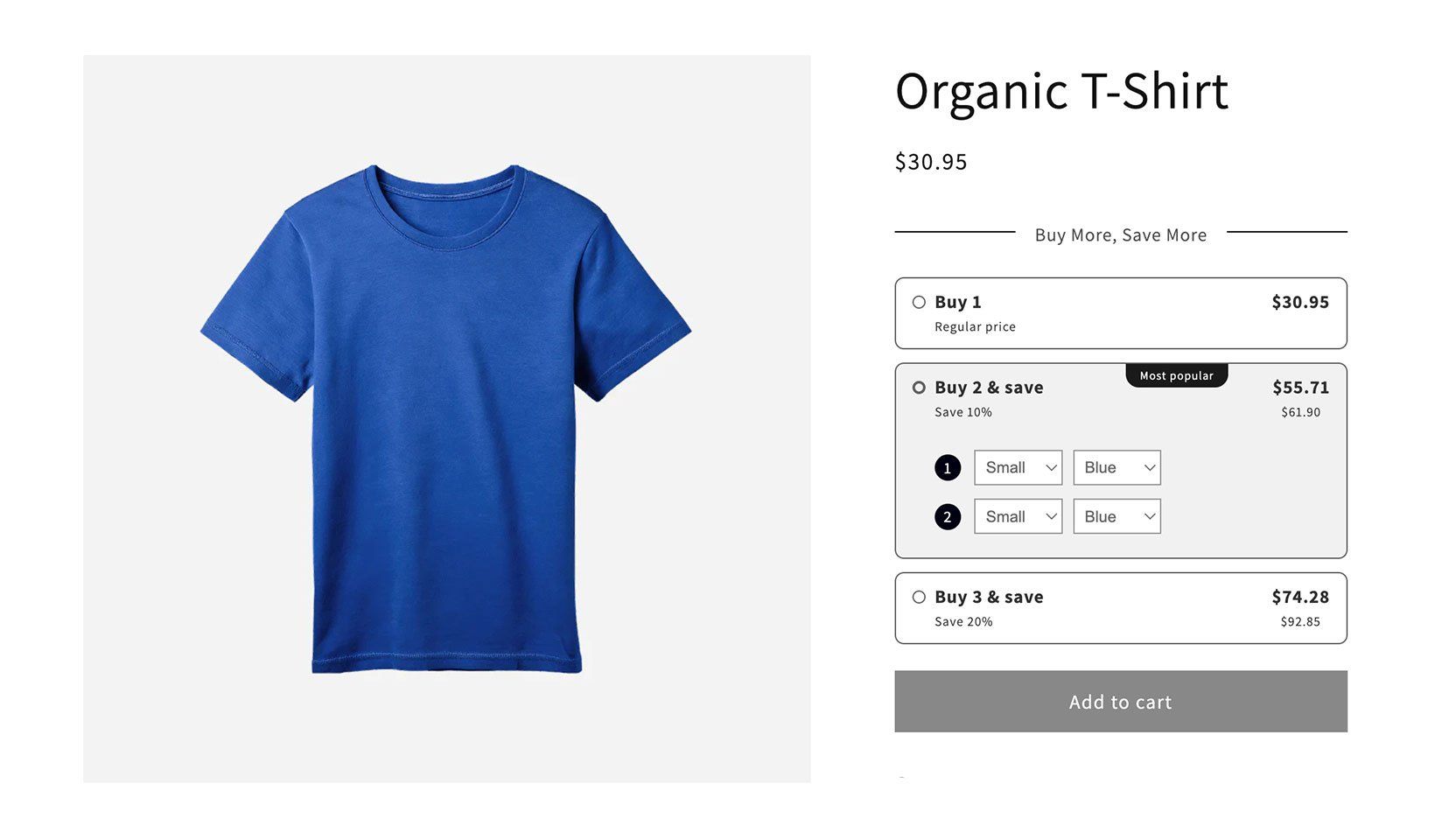
Shopify volume bundles shine when you want to nudge customers to buy slightly higher quantities. That alone can raise conversions.
Which Discount Strategy Drives More Sales?
It depends on your catalog and your customers. There is no universal winner.
Bulk discounts in Shopify and tiered pricing are ideal for the types of products that customers buy in large quantities. They don’t want a special offer for buying 2 or 3 items - they want to be rewarded for stocking up on a much bigger scale!
Think vitamins, coffee beans, socks, printer ink, or notebooks. Also think about the type of buyer - for example, B2B wholesalers will inevitably purchase higher quantities than retail buyers. A tiered discounts structure rewards larger orders without inventing a new offer.
Also use bulk pricing when the product is a routine purchase. Coffee, protein powder, supplements, stationery, cleaning refills, and disposable supplies are common examples. Customers often plan around tiers. They will add two more to reach the next threshold.
On the other hand, volume bundles excel when customers benefit from buying specific - and usually small - quantity groupings. They probably visited your site planning to buy a single quantity, and you can convince them that they’ll save money by purchasing a few extra items.
Use volume bundles when you want exact discount steps with strong visual cues. The tile layout drives clicks. It makes each option feel like a productized deal. This is effective on product pages with high traffic and simple choices.
If your Shopify store sells different types of products, then you might benefit from combining both types of quantity discount strategy. Use each lever where it fits best. Measure the impact on average order value and margin, and keep tweaking to find the perfect combination.
How to Set Up Bulk Discounts and Volume Bundles in Shopify
Shopify’s native tools handle discount codes and simple automatic discounts. However, they don’t offer advanced quantity logic or bulk discounts. For example, you cannot display proper tiered pricing tables or flexible volume bundles by default. A dedicated Shopify bulk discounts app solves this gap.
Barn2 Bundles & Bulk Discounts is the most practical option. This flexible app supports both types of bulk discounts: tiered pricing and volume bundles. You can set rules and discount priorities, preview the display, and apply discounts automatically without needing coupon codes.
Below, I show how to install the app and configure both discount types in any Shopify store. You can either follow along with the video tutorial, or use the written instructions.

Install the Bulk Discount App
Open the app listing for Barn2 Bundles & Bulk Discounts in the Shopify App Store. Click Install and choose a plan. You will land on the app’s home screen in your Shopify admin.
You can also find it any time under Apps in your Shopify sidebar. Pin it for quick access.
The home screen shows a table of discounts and, once orders come in, an analytics section for usage.
This is all you need to get started. Now you can create your first discount. First, I’ll show you how to create any type of discount. After that, I’ll provide configuration instructions for both tiered bulk discounts and volume bundles.
Create a New Discount
- Go to the Barn2 Bundles & Bulk Discounts home screen. Click Add New.
- Give your discount a clear name. This label will also appear in the cart when applied.
- Choose a Discount type. Pick ‘Volume Bundle’ for fixed quantity offers that replace the normal quantity selector. Pick ‘Bulk Pricing’ for Shopify tiered pricing with thresholds.
- Choose ‘Which Products?’ Either apply the Shopify discount globally, include selected products or collections, or exclude specific items. Variants are supported.
- Choose ‘Which Markets?’ Apply the discount globally, include specific markets, or exclude them. This helps tailor offers by region.
- Optionally schedule the discount by setting Active dates with a start and end time.
- Configure the fields for your chosen discount type. (See the next two sections for details.)
- Use the Preview panel to see how customers will view the discounts on the product page. Adjust the display options and design as needed.
- Click Save. If it is your first discount, you will be prompted to activate the widget in your theme. Click the button, confirm the placement in the Theme Editor, and save.
Configure Bulk Pricing Tiers
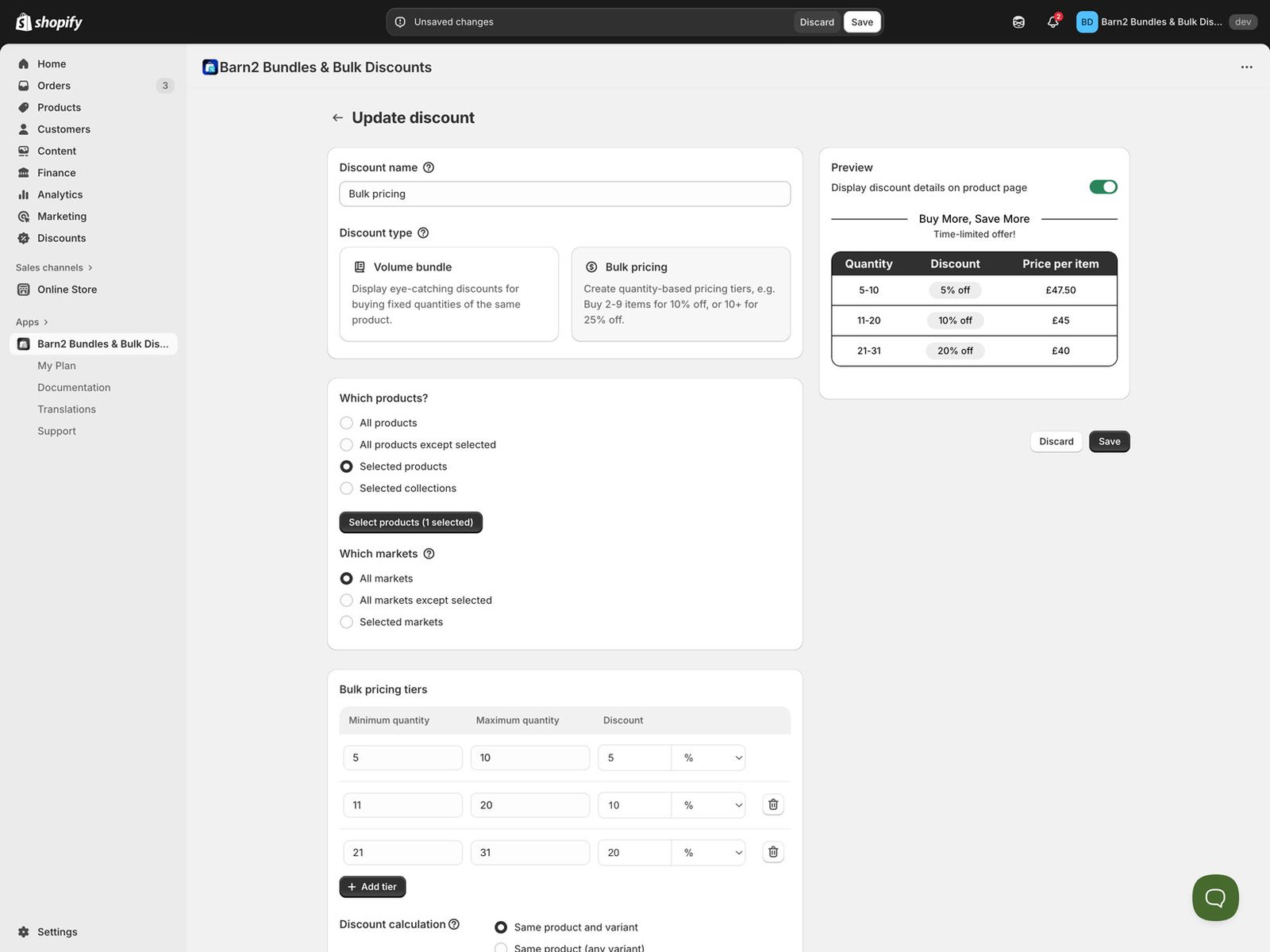
Bulk pricing creates threshold-based Shopify quantity break discounts. Customers qualify when they hit the minimum quantities for each tier.
In the table of bulk discount tiers, add rows with minimum quantity, maximum quantity, and the discount for the tier. Discounts can be percentage or fixed amounts. Leave the maximum quantity blank for open-ended tiers like 5+.
To set the bulk discount calculation logic, pick ‘Same product and variant’ to count identical variants only. Alternatively, pick ‘Same product any variant’ to combine variants of one product. Pick ‘Combine across discounted products’ to aggregate quantities across multiple eligible products or collections. This matters for stores with large catalogs and many variants.
Configure a Volume Bundle
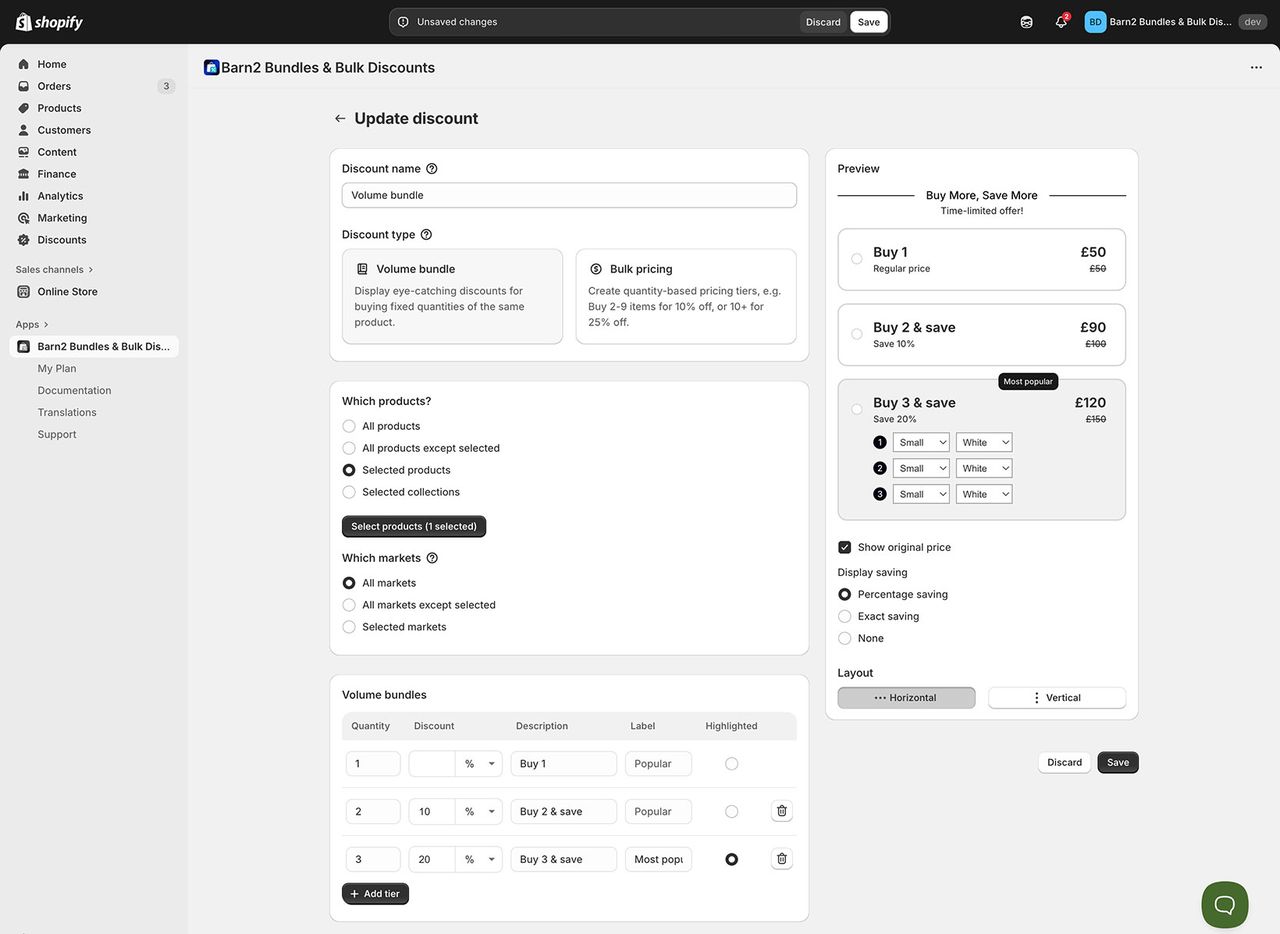
Volume bundles show a grid of pre-defined quantity options. They replace the standard quantity selector on the Shopify product page.
Use the table of volume bundles to define the quantity and the discount for each tile. The table starts with three rows for quantities 1, 2, and 3. Edit or add more rows. There is no hard limit on tiers, but keeping it to roughly five prevents clutter. For each volume bundle, you can set percentage or fixed discounts.
Add short descriptions to clarify the deal. You can add a badge like Best value and highlight a row to steer attention.
Avoid Common Mistakes
Follow these tips to drive more sales of your tiered pricing and volume bundles:
- Do not create too many tiers. Five is a practical upper bound for on-page clarity. The knowledge base warns that more tiers can clutter the page and overwhelm customers.
- Do not hide the value. Show the original price. Show the amount saved. Keep the headings short and direct. The preview makes this easy to validate before you go live.
- Do not forget markets. Targeting by market lets you tailor offers by region and avoid unintended discounts in the wrong country. The app supports market selection and exclusions.
- Do not rely on native discounts for advanced quantity logic. Native tools are fine for simple codes. A Shopify bulk discounts app is required for proper tiered tables and flexible bundles.
Final Thoughts
In Shopify, bulk discounts and volume bundles are not rivals: They are different tools for different jobs. Bulk pricing rewards larger quantities of the same item. In contrast, volume bundles make curated value obvious.
Use data to decide where each tool belongs. Start small. Launch one bulk discount and one bundle. Confirm the widget is active. Measure average order value, unit lift, and profit. Then iterate.
A Shopify bulk discounts app makes all this practical. It gives you tiered pricing tables and clear on-page displays. It also removes manual calculation and code complexity. This saves you time and prevents errors. That way, you can turn pricing strategy into reliable growth.
---
Guest post by Katie Keith, Founder and CEO at Barn2