

Struggling to Make Sales? Here’s Why Your Shopify Store Isn’t Converting (And How to Fix It)

A Shopify store not converting is one of the key phrases heard from most e-commerce store owners, whether they are new to the game or seasoned veterans. Why?
You're driving traffic to your Shopify store, but something feels off. Visitors arrive, browse around, and add items to their cart, but few actually make a purchase. If that sounds familiar, your issue isn't your product quality or price; it's how your store converts traffic into paying customers.
According to eCommerce expert Matthew Stafford, Managing Partner of Build Grow Scale, "traffic isn't your problem, your website’s conversion rate is." After years of helping hundreds of Shopify brands scale past the million-dollar mark, Stafford emphasizes that most store owners focus too heavily on ads and not enough on their site's ability to convert visitors into buyers.
So, if your Shopify store is not converting, here’s precisely why and what to do about it.
Why Your Shopify Store Is Getting Traffic But No Sales
Your Website Lacks Clarity and Simplicity
Consider your store from the perspective of your visitors. When they land on your homepage, are they immediately clear about:
- What do you sell?
- Why should they buy from you?
- How can they find the products they're looking for?
Most Shopify stores struggle with eCommerce sales problems because they don’t give clear and simple answers to key questions. Matthew Stafford's eCommerce solutions are always straightforward:
“Make your website so simple even Homer Simpson could understand it.”
A cluttered homepage, overly creative wording, or confusing navigation can frustrate visitors and push them away before they even explore your products.
You're Ignoring the Checkout Experience
Matthew Stafford and his team at Build Grow Scale have repeatedly found that the checkout is where the most significant leaks in conversion occur. Most Shopify store owners overlook optimizing their cart and checkout pages, assuming they're straightforward enough. Yet these pages are exactly where visitors frequently drop off.
Key issues include:
- Lengthy or complicated checkout forms
- Unclear or unexpected shipping costs
- Lack of clear explanations about why personal information (email or phone number) is needed
Your Upsells Aren’t Helping, They’re Hurting
Upselling at checkout can boost average order value if done correctly. However, if your upsells require extra thought or decision-making, they introduce friction. This friction can cause the buyer to second-guess their original purchase, resulting in cart abandonment.
Matthew Stafford explains:
“An upsell at checkout should feel like a quick, complementary no-brainer. Anything requiring extra thought decreases conversions.”
How to Fix Your Shopify Store’s Conversion Problems
Now that we understand why your store isn’t generating sales, let’s go through how to improve Shopify conversions, step by step.
Step 1: Optimize Your Cart and Checkout First (Not Last)
We always advise eCommerce store owners to start their conversion rate optimization process at the end of the customer journey and work backward. Why? Because improvements here immediately increase your revenue.
Practical tips for cart and checkout optimization to fix the Shopify store include:
-
Simplify Form Fields
Every additional form field you ask customers to fill in at checkout significantly increases friction. Fewer form fields directly correlate to higher conversions.
Ask only essential questions. At checkout, gather only the information necessary to complete the purchase. Typically, you only need:
- Customer Name
- Email address
- Shipping address
- Phone number (optional but beneficial if explained clearly)
- Payment details
Avoid asking for unnecessary information. Information such as age, gender, or “how did you hear about us?” might be helpful later for marketing, but it dramatically reduces conversions at the checkout stage.
Note: In 2023, Shopify launched a one-page checkout for all stores. It collects customer, shipping, and payment details on one simple page, reducing friction and boosting conversions. But if you want to customize the layout or checkout fields, you’ll need a Shopify Plus plan. For regular Shopify plans, focus on minor customizations and strong branding to improve the checkout experience.
-
Clearly Explain "Why" You Need Each Field
Shoppers are naturally hesitant to share their personal information unless they clearly understand its necessity. Explaining the reason beside each required field reduces hesitation and form errors:
- Email Field:
Clearly state the purpose with text such as:
Email: "Required for order confirmation."
- Phone Number Field:
Make customers comfortable sharing their phone number by explicitly telling them its purpose:
Phone Number: "Required for shipping notifications."
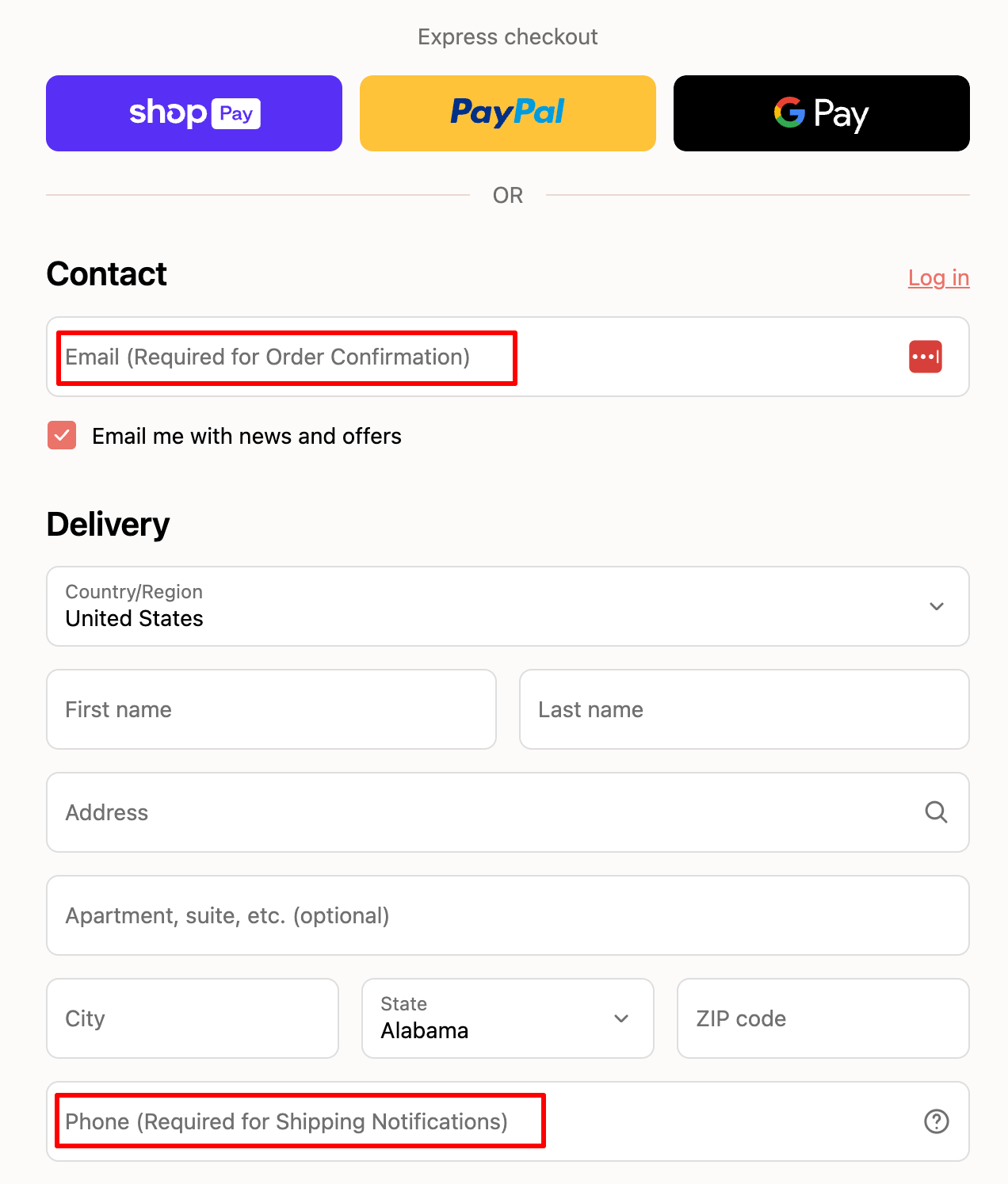
This small tweak significantly increases the accuracy of information customers provide, improving both conversion rates and follow-up marketing efforts, such as abandoned cart recovery.
-
Remove All Possible Distractions
The primary goal of your checkout page is straightforward: complete the purchase. Any distractions or confusing elements can steer customers off course, losing sales at the last moment.
Step 2: Discover Problems by Asking Your Customers Directly
One of the most effective ways to uncover hidden issues in your Shopify store is to ask customers a single, simple question after they purchase:
“What was the one thing that almost made you not buy?”
This question provides direct, actionable feedback from actual buyers. You’ll quickly discover friction points and objections you might not have noticed. Build Grow Scale's clients have utilized this strategy to achieve conversion lifts of 10-15%, resulting in millions of dollars in additional revenue.
Step 3: Simplify and Clarify Your Homepage
Your homepage has only two primary purposes:
- Clearly communicate your value proposition.
- Provide easy navigation to products.
Don’t treat your homepage like a detailed catalog. Keep it simple.
- Headline: Clearly state what you sell and why customers should care.
- Navigation: Simplify to help visitors quickly find the products they're looking for. No more than 3-5 menu items.
- Call-to-Action (CTA): Have one primary CTA (e.g., "Shop Now," "View Bestsellers"). Make it obvious and irresistible.
Step 4: Prioritize Mobile Experience
More than 80% of eCommerce traffic is mobile. Yet, many Shopify stores are primarily designed for desktop use. When coming up with eCommerce growth strategies for your Shopify store, you should include rigorous testing of the mobile experience, asking questions like:
- Is the navigation intuitive on mobile?
- Are buttons easy to tap, even on small screens?
- Is your checkout process frictionless and fast?
Regularly test your store on various mobile devices to ensure a seamless buying experience.
Step 5: Use Social Proof Wisely
Studies show that having over 200 customer reviews can nearly double your conversion rate. Shoppers trust honest feedback from other buyers more than brand messaging.
To optimize social proof:
- Actively ask for reviews and testimonials.
- Showcase customer reviews prominently on your product pages.
- Include user-generated content (photos, videos, testimonials) on your homepage.
Using Data and Behavioral Science to Increase Online Store Sales
Use Your Shopify Data
One of the most powerful strategies of data analysis involves using Google Analytics and Tag Manager to track visitor interactions on your site.
These tools let you:
- Identify which elements of your site users click or ignore.
- Uncover friction points in your checkout process.
- Monitor form abandonment rates and pinpoint areas for improvement.
Investing time in clean data collection helps you make informed, strategic decisions.
Behavioral Science Techniques
Minor adjustments to your Shopify store's design can significantly impact purchasing decisions. The way shoppers perceive your products, pricing, and overall experience plays a massive role in converting visitors into buyers.
- Anchoring Prices: Customers don’t assess prices in isolation; they consider the context. By placing premium-priced products alongside your target item, you establish a higher "anchor" price. This makes your target product price seem more reasonable.
- Reducing Decision Fatigue: Too many choices overwhelm visitors, leading to analysis paralysis and lost sales. When you present a simpler set of options, your customers feel less overwhelmed and are more likely to make a buying decision quickly.
- Limit product variations to the most popular or essential choices: colors, sizes, and bundles.
- On checkout pages, avoid suggesting unrelated or complex product add-ons that require deeper consideration. Instead, stick to clear, complementary options like warranties, protection cases, or gift wrapping.
Reducing decision fatigue guides your customers smoothly through checkout, preventing them from hesitating or abandoning their carts at the final step.
- Simplified Typography: Typography isn't just a design choice; it impacts cognitive load and clarity. Fancy or complicated fonts may seem appealing at first glance, but they're much harder for customers to read quickly.
- Choose clean, easy-to-read fonts to create a frictionless shopping experience.
- Larger, clear text, especially for pricing and call-to-action buttons, simplifies decision-making, leading to quicker buying actions.
- Avoid using cursive, decorative fonts, or overly stylized typography on important purchase information, like product descriptions, pricing, and checkout fields.
Straightforward typography reduces mental effort, making your store feel intuitive and trustworthy, which naturally boosts conversions.
Using AI for Future-Proof Optimization
As eCommerce evolves, AI-powered optimization is becoming essential. Using AI tools like Google Gemini can analyze your Shopify store data to predict which adjustments will yield the highest ROI.
Potential uses of AI in Shopify optimization:
- Automatically personalize experiences based on visitor profiles.
- Predict customer behavior and proactively optimize journeys.
- Quickly analyze large amounts of data to identify hidden conversion barriers and opportunities.
Final Thoughts: Take Action and Start Converting More Sales Today
If your Shopify store isn't converting, stop pouring money into more traffic and ads. Shift your focus to improving your site's conversion experience by utilizing the eCommerce expert tips we have shared.
The proven revenue optimization strategies outlined above provide clear, actionable steps to quickly boost your conversion rate and significantly increase online store sales.
Ready to stop guessing and start scaling? Learn more about conversion optimization strategies by visiting Build Grow Scale and unlock your Shopify store’s full potential today.
Need Expert Help?
If you found these eCommerce optimization tactics valuable, consider reaching out to eCommerce optimization experts at Build Grow Scale. We have helped hundreds of Shopify merchants scale beyond seven figures, and we can do the same for you.
Click here to schedule a call and start optimizing your Shopify store now!
--
Guest Post by: Matthew Stafford is a veteran ecommerce strategist and Managing Partner at Build Grow Scale. He helps online store owners scale to 7–8 figures using Revenue Optimization™ strategies that increase conversions, profits, and sustainable growth, without needing more traffic.